
Tuesday, July 26, 2011
Blog standby
Due to the fact that I'll be very busy for these 4 next month ( thanks to my new job at Dr D :) ) there will be less new messages and wip on the blog ... Coming back after the end of Happy Feet 2 !

Saturday, July 23, 2011
Foundry releases NUKE 6.3
The Foundry have released Nuke 6.3 with news features like 3D Particles, Deep Compositing support, Displacement shader and much more !
http://www.thefoundry.co.uk/products/nuke/
http://www.thefoundry.co.uk/products/nuke/
Wednesday, June 29, 2011
Last Day !
Here we are ! Today is my last day at Ubisoft, after 5 years I'm going to new adventures :) And that smells good Sydney and Happy Feet 2 ... More informations soon !! :)
Tuesday, June 21, 2011
GJ 3 PointsLight for Maya
I decided to work on a version of my Houdini tool GJ 3 PointsLight, for Maya, with Python. So here is the first version in beta, it creates a simple 3 points light rig attributs on the circle shaphe "Controls" ( Color, intensity, shadows, Position etc. ).

UPDATE:
v0.2 (new)
- Positions controls added
v0.1
- More options available like Shadow type, Cone angle, Penumbra, etc.

v0.1 UI
UPDATE:
v0.2 (new)
- Positions controls added
v0.1
- More options available like Shadow type, Cone angle, Penumbra, etc.
Thursday, June 16, 2011
Making of and Interview in "3DMag"
Et voilà !le magasine 3DMag m'a demandé pour le numéro hors série un Making of ainsi qu'une petite interview, il est sortit hier ! Merci 3DMag :)
Here we are :) The french "3D Mag" asked me a little interview and a "making of" for the summer number. It's been released since yesterday :) Thanks 3D mag !

Here we are :) The french "3D Mag" asked me a little interview and a "making of" for the summer number. It's been released since yesterday :) Thanks 3D mag !

Monday, June 13, 2011
How to use Mental Ray Production shader in Maya
Just a quick message to show how to use hidden MentalRay Production Shader ( More in this .PDF ).
There are a lot of very useful shader hidden in MentalRay such as Rayswitcher, Matte/shadow, Mirror/gray ball etc... but they are for the moment not supported by autodesk.
How to see those shaders in the Hypershade ?
First go in the folder : Program Files\Autodesk\Maya2012\scripts\others and find the mentalrayCustomNodeClass.mel and open it with a text editor.
At the end of the file you will find this line " $enableMAPShaders == 0 ) || " change the "0" to "1" save the file, and restart Maya !
If Node are not displayed in the hypershader you can type in the "mel" input the line : createNode + the name of the node for instance :

There are a lot of very useful shader hidden in MentalRay such as Rayswitcher, Matte/shadow, Mirror/gray ball etc... but they are for the moment not supported by autodesk.
How to see those shaders in the Hypershade ?
First go in the folder : Program Files\Autodesk\Maya2012\scripts\others and find the mentalrayCustomNodeClass.mel and open it with a text editor.
At the end of the file you will find this line " $enableMAPShaders == 0 ) || " change the "0" to "1" save the file, and restart Maya !
If Node are not displayed in the hypershader you can type in the "mel" input the line : createNode + the name of the node for instance :

Sunday, June 12, 2011
GJ 3 Points Light for Houdini
Here is a new digital asset for Houdini ! Just a simple 3 Points lighting Rig with ambiant occlusion. You have acces to every parameters from one window !

Features:
v1.5 (new!):
- GI light added
- Some bugs in Quick render fixed
v1.0a :
- "Quick Render !" button and parameters added
- More display options and transform bugs fixed
Features v1.0:
- Key Light options ( Color, intensity, shadow, attenuation etc.)
- Fill Light options ( Color, intensity, shadow, attenuation etc.)
- back / Rim Light options ( Color, intensity, shadow, attenuation etc.)
- Ambient option ( Ambient occlusion )
- Camera setup
- Position parameters for all lights
- Display options ( Color, Display on / off )
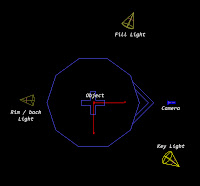

Features:
v1.5 (new!):
- GI light added
- Some bugs in Quick render fixed
v1.0a :
- "Quick Render !" button and parameters added
- More display options and transform bugs fixed
Features v1.0:
- Key Light options ( Color, intensity, shadow, attenuation etc.)
- Fill Light options ( Color, intensity, shadow, attenuation etc.)
- back / Rim Light options ( Color, intensity, shadow, attenuation etc.)
- Ambient option ( Ambient occlusion )
- Camera setup
- Position parameters for all lights
- Display options ( Color, Display on / off )

Lights Rig
Monday, June 6, 2011
GJ CompManage Updated !
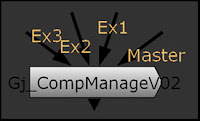
Here we are, a new version of the Nuke Gizmo "GJ CompManage V0.2" is available HERE
News features :
- Unpremult / Premult options
- More color correction options available
- Minor UI changements
The tool is still moving and still in beta.
Saturday, June 4, 2011
GJ Rock IT !
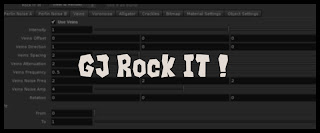
I'm working on a new tool : GJ Rock IT ! To help the creation of rocks, ground, etc. proceduraly, of course :)
Here are somes exemples :


(Still work in progress)
Features:
V0.2a (New !)
- Some UI changements
- A "Bump map" parameter in "Material settings"
- Now you can use R, G, B as well as luminance of a file as bitmap layer.
V0.2
- A new layer available : Crackles
- 2 Modes for the voronoise layer : VoroNoise & WorleyNoise
- News object settings : Edges creases override
V0.1a
- "Rotation" Parameter for all noise layers
V0.1
- 5 noise levels : 2X Perlin noise, Voronoise, Veins, Alligator Noise
- 1 bitmap layer
- 2 displace modes : Object level ( View + Render ) or shader level ( Render only )
- Use as bump ( Render Only )
- Use as bump ( Render Only )
- Material settings
- Use custom mesh or procedural
- Use custom mesh or procedural
Monday, May 30, 2011
FX guideTV about Katana & Deep opacity
On Fxguide website there is a very interesting video from the FMX with lots of information about Katana and the new open EXR 2.0 and the feature of deep compositing, the article (video) HERE !
Source: http://www.fxguide.com
EDIT:
More informations on awn.com about the integration of deep compositing in Nuke 6.3 scheduled in June !
Article HERE
Source: http://www.fxguide.com
EDIT:
More informations on awn.com about the integration of deep compositing in Nuke 6.3 scheduled in June !
Article HERE
Friday, May 13, 2011
GJ SafeFrame
Thanks to Nuke 101 Book by Ron Ganbar, I decided to create a Nuke gizmo witch allow the user to setup 3 safe frames (Title, Action and Custom ) with somes options like size of label, colors, custom label etc.


Thursday, May 12, 2011
Lego WIP
A new work in progress picture :) based on a Lego but in a steampunk style :) here is the first step of modeling :


Subscribe to:
Comments (Atom)